

Your Complete Guide to Charmius Login and Sign Up
Account setup takes under five minutes. The process for Australian players runs through four stages: fill in the registration form, confirm your email, complete your profile, and pass KYC before your first withdrawal. Charmius registration uses AUD as the default currency for Australian accounts, all data is protected by TLS 1.2 and AES 256-bit encryption, and the account is governed by our Tobique Gaming Commission licence (No. 0000181). You must be 18 or older to register.
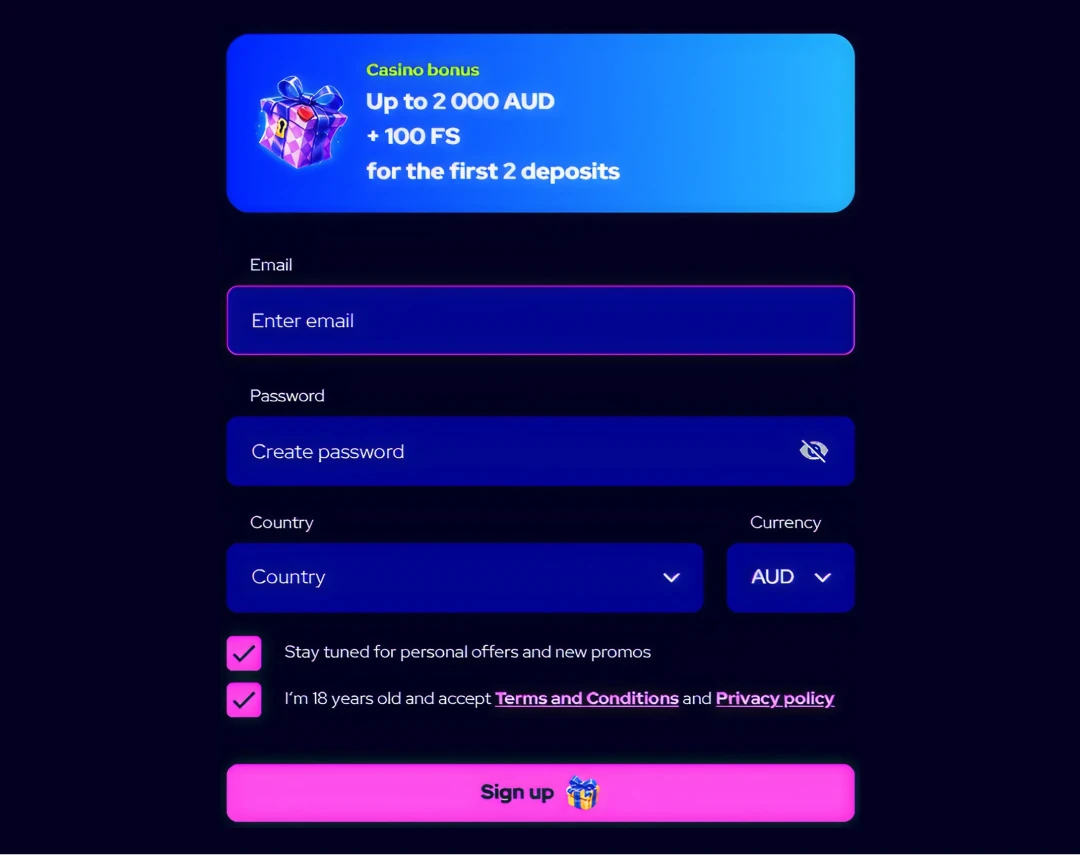
Step 1 — Fill In the Sign-Up Form
The form is short. Press the “Sign up” button on our homepage and you will see the welcome bonus banner — the same screen where you claim welcome bonus across your first two deposits. Four fields need to be filled in before you can proceed with Charmius sign up:
| Field | What to Enter |
| A valid address you can access immediately | |
| Password | Chosen password (show/hide toggle available) |
| Country | Select Australia from the dropdown |
| Currency | Select AUD |
Two checkboxes sit below the fields. The first, opting in to personal offers, is pre-ticked — you can untick it freely. The second, confirming you are 18+ and accepting our Terms and Conditions and Privacy Policy, is unticked by default and must be ticked manually before the form will submit.
Once you press “Sign up,” your account is created. Charmius registration is complete at this stage for browsing purposes, but withdrawal access requires the additional steps below. If you already have an account, the “Have an account? Log in” link on the same screen takes you directly to the login form.
To Charmius create account correctly, make sure the email address entered is active — the activation link lands there immediately.
Step 2 — Confirm Your Email Address
A confirmation email is sent automatically the moment registration completes. Open it and click the activation link. That single click verifies ownership of the address and keeps your account in good standing. Following this Charmius sign up guide closely at this stage matters, because an unverified email delays certain bonus activations — including the 10 free spins tied to email confirmation (bet value: 0.20 AUD, wagering: x40, max win: 75 AUD).
If the email does not arrive within a few minutes, take these steps in order:
- Check your spam or junk folder first — automated messages frequently land there
- Confirm the address entered during registration was typed correctly
- Log in, navigate to Profile, and trigger a manual resend from within the account settings
- Contact our 24/7 live chat support if none of the above resolves the issue
After confirmation, the Charmius login becomes fully active. All bonus notifications, including free spin credits, start appearing via the gift box icon in the top-right corner of the screen. Email verification is also a prerequisite for identity verification, which must be completed before any withdrawal is processed.
Step 3 — Complete Your Profile Details
Filling in personal details is not optional for withdrawals. Our system will prompt you with: “To withdraw faster, fill in your personal info and verify your email.” Work through the two-part profile form using the Charmius registration steps below to avoid delays later.
Part 1 — Personal Info:
- First name and last name — exactly as shown on your government-issued ID
- Country code and phone number — Australian mobile or landline
- Date of birth — required for age verification under our KYC obligations
Part 2 — Address Info:
- Region, city, street address, and Australian postcode — all fields are mandatory
Once both parts are saved, the Charmius account setup is complete on the profile level. This also unlocks identity document upload in the Verification tab. Before you make a deposit, confirm that your name and address match the documents you will use for KYC — mismatches cause delays. Currency is fixed to AUD at registration; changing currency requires closing the current account and opening a new one.
Step 4 — KYC Verification Before Your First Withdrawal
Verification is done once. It takes 2 to 24 hours after documents are submitted. No withdrawal request will be processed on an unverified account, so completing KYC early — before you need to withdraw — is strongly recommended. This Charmius registration guide covers what you need to upload:
| Document Type | Accepted Format | Requirement |
| Identity | Passport, driver’s licence, national ID | Valid and not expired |
| Proof of address | Utility bill, bank statement | Issued within the last 3 months |
| Payment method | Card photo or e-wallet screenshot | First 6 and last 4 digits visible; CVV fully covered |
Documents must be clear and complete. Blurred, cropped, or altered files will be rejected, which adds time. Payment verification only becomes available after identity documents have been reviewed and accepted — that order is fixed.
We apply AML (Anti-Money Laundering) procedures and Customer Due Diligence across all accounts. This is standard compliance practice, not a barrier — it protects your funds and confirms that only you can access your account. Withdrawal requests are reviewed within 24 hours on our end, after which processing time depends on the method: crypto takes around 2 hours; bank transfer takes up to 4 days.
One Account Per Person: The Rule That Matters
Our terms are unambiguous: one account per person, per household, and per IP address. Duplicate accounts are subject to immediate blocking, and any associated winnings may be voided. This applies to all Australian players without exception.
There are a few scenarios that trigger a second-account flag:
- Two family members at the same physical address attempting to register separately on the same device or IP
- A player registering again after forgetting their original credentials — use password reset instead
- Using a VPN or proxy during registration — this is a direct breach of our Terms and Conditions
For players who want to confirm our credentials before creating an account, details on our Tobique Gaming Commission licence and operating structure are covered in the is Charmius legit section. We operate under Tobique Gaming Act 2023, and disputes are handled by EGIS, our CGA-certified ADR provider.
Charmius registration creates a single AUD account. If you need to change your registered currency, the only path is to close the existing account via support and open a fresh one.
When you register at Charmius Australia, that account is yours alone — shared access or credential transfers breach T&C and can result in permanent closure.
Logging In and Resetting Your Password
Two fields. That is all Charmius Casino login requires: your email address and your password. The password field has a show/hide toggle. If you have previously logged in, the browser may autofill both. The “Forgot your password?” link sits directly above the login button.
The password reset flow is straightforward:
- Click “Forgot your password?” on the Charmius login screen
- Enter the email address associated with your account
- Press “Send link” — a reset link arrives by email within minutes
- Check spam if the email does not appear promptly
- Click the link, set a new password, and log back in
After logging in, all profile tabs are accessible: Profile, My Level, Bonuses, Promo Code, Verification, Limits, and Bets History. To log out, navigate to Profile and use the “Log out” button — there is no auto-logout on inactivity by default.
Changing your registered email is not a self-service function. Contact our support team via live chat or email to request the update. Keep your credentials private — our system cannot be held responsible for losses resulting from shared access or compromised devices.
Frequently Asked Questions
How long does Charmius account registration take?
The form itself takes under two minutes to complete. Email confirmation is instant. Full KYC verification takes between 2 and 24 hours once documents are submitted — after which withdrawal access is active.
Can I register with a currency other than AUD?
At sign-up, select AUD from the currency dropdown. Changing currency after account creation is not possible without closing the account. One account per currency is the fixed rule.
What happens if I do not verify my email?
Certain bonuses, including the 10 free spins tied to email confirmation, will not be credited. Email verification is also required before identity documents can be uploaded for KYC.
What documents are accepted for KYC verification?
A valid passport, driver’s licence, or national ID covers identity. Proof of address must be dated within the last 3 months. Payment method verification is required after identity documents are approved.
How do I recover my account if I cannot log in?
Use the “Forgot your password?” link on the login screen. Enter your registered email, receive the reset link, and set a new password. If the email is no longer accessible, contact live chat support directly.